Every hour your business can’t operate normally costs you money. Not just in lost sales, but in payroll that still has to be paid, data that doesn’t get recorded, customers who go somewhere else, and accounting records that fall out of sync. For small and mid-sized businesses, a single afternoon of downtime can wipe out a week of profit.
Most business owners don’t realize how expensive downtime actually is until it happens. By then, the damage is already done: missed deposits, duplicated transactions, stressed employees, and the painful cleanup that lands on your bookkeeper’s desk weeks later.
This guide breaks down what business downtime actually costs, why small businesses are hit hardest, and what you can do to protect your revenue, your records, and your reputation.
What Is Business Downtime?

Business downtime is any period when your normal operations are interrupted and your team cannot serve customers, process transactions, or access the systems they need to do their work. It can last five minutes or five days. Either way, it costs you.
Downtime usually falls into three categories:
- Planned downtime happens when you schedule maintenance, software updates, or system migrations. It’s manageable because you can prepare for it, work around it, and communicate it to customers in advance.
- Unplanned downtime is the expensive kind. Network failures, power outages, cyberattacks, and hardware crashes all fall into this bucket. These events hit without warning and usually happen at the worst possible time.
- Partial downtime is the sneaky one. Your systems technically work but they’re slow, unreliable, or one critical component is broken. Your POS processes cards but can’t print receipts. Your accounting software opens but can’t sync. Your internet works but VoIP calls drop. This type of downtime is often ignored until it’s been draining money for months.
How Much Does Downtime Actually Cost?
The real cost of downtime is almost always higher than business owners estimate. It’s not just lost sales during the outage. It’s the full chain reaction that follows.
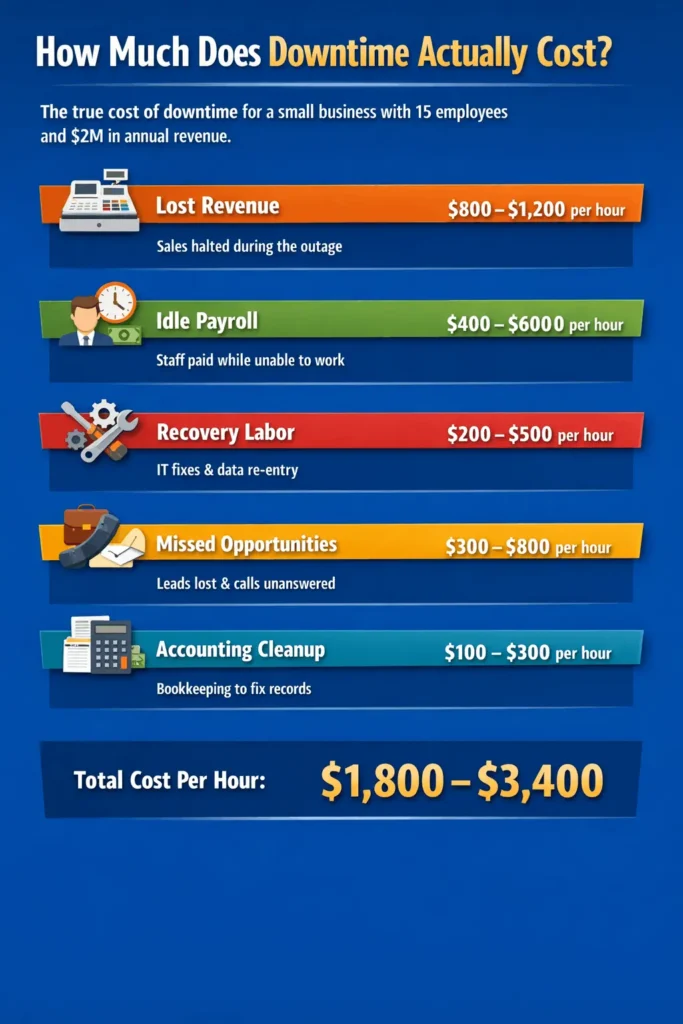
Here’s a realistic cost breakdown for a small business with 15 employees doing $2 million in annual revenue:
| Cost Component | What It Covers | Estimated Hourly Cost |
| Lost revenue | Sales you could not process during the outage | $800 to $1,200 |
| Idle payroll | Employees being paid while unable to work | $400 to $600 |
| Recovery labor | IT troubleshooting, data reconciliation, manual re-entry | $200 to $500 |
| Missed opportunities | Leads lost, quotes not sent, calls unanswered | $300 to $800 |
| Accounting cleanup | Bookkeeper hours fixing broken records and reconciling gaps | $100 to $300 |
| Total per hour | $1,800 to $3,400 |
For larger operations, this number climbs fast. Industry reports suggest that small and mid-sized businesses commonly see downtime costs ranging from $10,000 to $50,000 per hour depending on size and industry. For businesses dependent on real-time transactions, like retail, hospitality, and logistics, the number goes higher.
But the numbers above are just the direct costs. The harder-to-measure costs often matter more.
A good commercial network cabling can cost less then what downtime can cost.
Business downtime cost per hour (infographic Below)
The Hidden Financial Costs Most Owners Overlook
Accounting Data Corruption
When systems go down mid-transaction, records break. A sale gets recorded in your POS but never syncs to QuickBooks. A payment gets processed but the invoice doesn’t update. A payroll batch gets interrupted halfway through.
These gaps don’t stay small. Weeks later, your bookkeeper is reconciling three weeks of mismatched records, and you’re paying for the hours it takes to clean up. Worse, if the gap isn’t caught, it flows into your tax return, your financial statements, and your decision-making.
Tax and Compliance Risk
Missing records create compliance exposure. Sales tax reports rely on accurate transaction data. Payroll filings rely on accurate time and wage data. If downtime corrupts or delays those records, you’re looking at amendments, penalties, and possibly an audit trigger.
Cash Flow Disruption
When invoicing systems fail, invoices don’t go out. When invoices don’t go out, customers don’t pay. A two-day outage can push your receivables back by two weeks, which starves your cash flow right when you’re already absorbing the recovery costs.
Customer Trust Erosion
Customers remember the business that couldn’t process their card. The patient whose appointment got lost. The client whose report was late. Trust takes years to build and one bad outage to damage.
What Causes Business Downtime
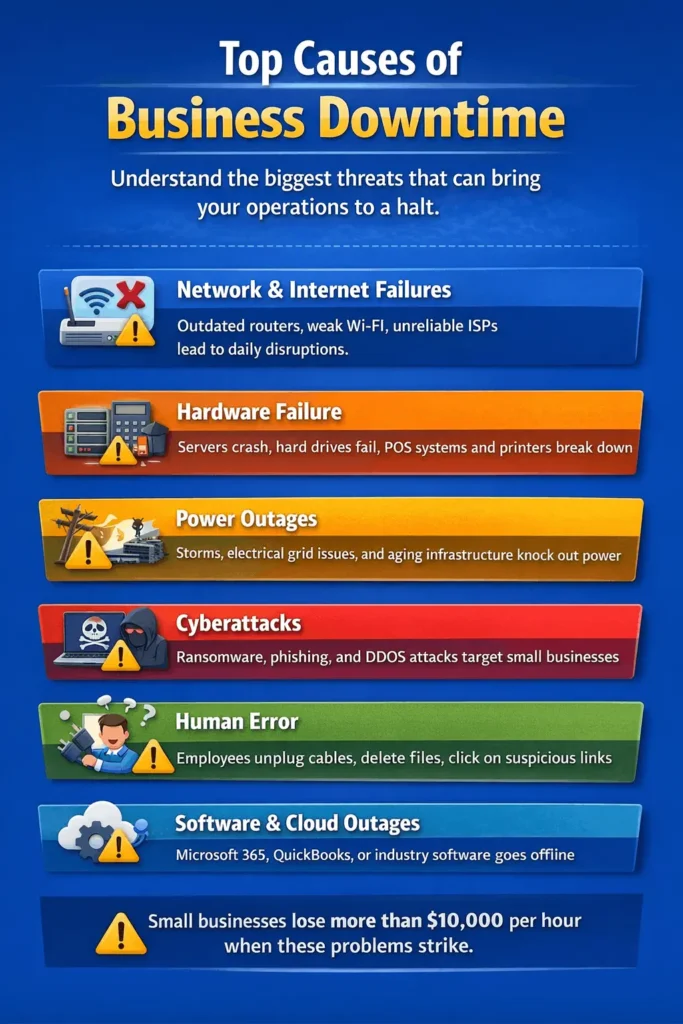
Understanding the causes helps you figure out where your real risk sits. Most small business downtime traces back to one of these sources.
Network and Internet Failures
This is the most common cause and the most often ignored. Weak Wi-Fi coverage, outdated routers, poorly installed cabling, and unreliable ISPs all create daily disruption. Most businesses accept this as normal when it absolutely is not. A properly designed network should run for years without noticeable issues.
Hardware Failure
Servers fail. Hard drives crash. POS terminals die. Printers stop talking to the network. Equipment that is more than five years old is operating on borrowed time, and when it goes, it usually goes at the worst moment.
Power Outages
Chicago businesses deal with this more than most. Storms, grid failures, and electrical issues in older commercial buildings regularly knock out power. Without backup power and cloud-based systems, operations stop immediately.
Cyberattacks
Ransomware, phishing, and DDoS attacks have become the fastest-growing cause of serious downtime. Small businesses are now the primary target because attackers know they rarely have proper defenses. A single ransomware incident can shut operations down for a week or longer.
Human Error
Someone deletes the wrong folder. A contractor unplugs the wrong cable. An employee clicks a suspicious link. Human error causes more outages than any technology flaw, and the only real defense is training combined with systems that limit how much damage one mistake can do.
Software and Cloud Service Outages
When Microsoft 365, QuickBooks Online, or your industry-specific software has problems, your business is affected whether you caused it or not. These are rare but real.
Top causes of business downtime (infographic breakdown):
How to Calculate Your Business’s Downtime Cost
Before you can justify spending money to prevent downtime, you need to know what it actually costs you. Here is a straightforward formula:
Hourly Downtime Cost = Lost Revenue + Idle Labor + Recovery Cost + Accounting Cleanup
Work through each piece:
Step 1: Lost Revenue. Take your annual revenue, divide by working hours per year (usually 2,080 for a standard business). That’s your baseline hourly revenue. Adjust up for peak hours, down for slow periods.
Step 2: Idle Labor. Add up hourly wages for every employee who cannot work during downtime. Include loaded cost (wages plus benefits and taxes), not just base pay.
Step 3: Recovery Cost. Estimate hours needed to get systems back and records caught up. Multiply by the relevant hourly rates, including IT help and bookkeeping.
Step 4: Accounting Cleanup. This one is often missed. Ask your bookkeeper how many hours they typically spend fixing issues after a system outage. Multiply by their rate.
Add all four. That’s your true cost per hour. Most small business owners are shocked when they run the numbers honestly. This becomes the business case for investing in prevention.
How to Minimize Downtime and Protect Your Business
You cannot prevent every outage. You can absolutely reduce how often they happen and how badly they hurt when they do.
Invest in Reliable Network Infrastructure
This is the single most impactful step, and it’s also the most neglected. A properly designed business network, with quality cabling, enterprise-grade equipment, and redundant internet connections, eliminates the majority of small business downtime. Chicago businesses that want a solid baseline often work with a local partner who provides network support in Chicago that covers monitoring, fast response, and proactive maintenance. The cost of good infrastructure is almost always less than the cost of one serious outage.
A Note from Heard Associates
Practicing what we preach matters. When our own network infrastructure wasn’t keeping up with our growing practice, we partnered with Chicago Network Solutions to redesign it. The difference in reliability has been noticeable. We recommend them to clients who ask us who handles our IT, and we’re happy to share that recommendation openly.
Back Up Everything, Automatically
Your accounting data, customer records, files, and system configurations should all be backed up automatically to an off-site or cloud location. Daily at minimum, continuously if possible. Test the backups regularly. A backup you’ve never restored is not a backup, it’s a hope.
Move Critical Systems to the Cloud Where It Makes Sense
Cloud-hosted accounting software, email, and file storage survive local outages. If your office loses power, you can work from anywhere. This does not eliminate downtime risk, but it massively reduces single-point-of-failure exposure.
Add Redundancy
A second internet connection from a different provider. A UPS on critical equipment. A backup generator if power is a real risk. Redundancy costs money upfront and saves money the first time it’s needed.
Train Your Team
Most cyberattacks start with an employee clicking something they shouldn’t. Twenty minutes of training every quarter prevents more incidents than any software tool. Cover phishing, password hygiene, and what to do when something feels wrong.
Document Your Recovery Plan
Write down what happens when the internet goes out. When the server crashes. When ransomware hits. Who calls who, which systems come back first, who talks to customers. A one-page plan that everyone knows beats a fifty-page plan nobody has read.
Perform Regular Maintenance
Equipment and networks need ongoing attention. Firmware updates, security patches, hardware checks, and cable inspections all prevent failures before they happen. Regular network maintenance is one of the highest-ROI activities a business can commit to, and yet it’s often the first thing cut when budgets get tight.
When to Act
If any of these apply to your business, you are already overdue for an infrastructure review:
| Warning Sign | What It Signals |
| Internet or Wi-Fi drops more than once a week | Network design or hardware issue |
| Employees regularly restart equipment to make it work | Failing hardware, time to replace |
| Accounting or POS systems freeze or lag | Sync issues, often network-related |
| You have no tested backups | Major data loss risk |
| Your last IT review was more than two years ago | Configuration drift and security gaps |
| You depend on one internet connection | No redundancy, single point of failure |
Any two of these is a yellow flag. Any four is a red one.
Why Your Bookkeeper Cares About Downtime
Downtime isn’t just an IT problem. It’s a financial records problem, which makes it an accounting problem.
Every outage creates gaps in your books. Transactions that didn’t record. Payroll that didn’t run cleanly. Invoices that didn’t send. Deposits that didn’t reconcile. The bookkeeper is the one who finds these gaps, often weeks later, and has to piece the picture back together.
The cleaner your operational systems run, the cleaner your financial records are. The cleaner your records, the faster your month-end close, the more accurate your tax filings, and the better your financial decisions. In this way, infrastructure reliability and accounting accuracy are two sides of the same coin.
Business owners who treat infrastructure as an expense end up paying more for accounting cleanup, more in compliance risk, and more in missed opportunities. Owners who treat it as an investment get better books, smoother operations, and fewer surprises.
Final Thoughts
Business downtime is expensive in ways that don’t show up on any single invoice. It costs revenue, it costs labor, it costs data, and it costs trust. For small businesses, which rarely have the reserves to absorb a serious outage, the risk is real and worth taking seriously.
The good news is that most of the cost is preventable. Solid infrastructure, good backups, proper training, and a written recovery plan will eliminate the vast majority of serious downtime risk. The businesses that invest in these basics rarely think about downtime. The ones that don’t, think about it often, usually at 3pm on a Tuesday when everything stops working.
Your accounting firm can help you quantify the financial exposure. Your IT partner can help you reduce it. Between the two, you have everything you need to protect the business you’ve built.
Frequently Asked Questions
How much does one hour of downtime cost a small business? For most small businesses with 10 to 30 employees, one hour of downtime typically costs $1,500 to $5,000 when you factor in lost revenue, idle labor, recovery work, and accounting cleanup. Industries with real-time transactions like retail, restaurants, and healthcare tend to see higher numbers.
What is the most common cause of business downtime? Network and internet issues are the most common, followed by hardware failure and human error. Cyberattacks are the fastest-growing cause and the most expensive per incident.
Does business insurance cover downtime? Business interruption insurance may cover some downtime-related losses, but coverage varies widely and often excludes cyber incidents. Review your policy carefully and consider separate cyber liability coverage if you store customer data or process transactions electronically.
How often should a small business back up its data? Daily at minimum. Continuously for accounting, POS, and customer records. The backup should be stored off-site or in the cloud, and you should test a restore at least quarterly.
Can downtime affect my tax filings? Yes. If downtime corrupts or delays transactional data, it can flow into inaccurate sales tax filings, payroll filings, and income tax returns. This creates amendment costs and, in some cases, penalty exposure.
What is the best way to reduce downtime risk for a small business? Three steps cover most of the risk: invest in reliable network infrastructure with monitoring, set up automatic cloud backups that you actually test, and document a simple recovery plan your whole team knows. These three alone prevent the majority of serious incidents.